
How to Delete All Reposts on TikTok at Once (2026)
Learn the current methods for deleting TikTok reposts in bulk, including how to request the feature and the best manual steps. Updated for 2026.
TL;DR (Quick Answer)
Is there a "Delete All" button on TikTok?
No. As of 2026, TikTok officially requires you to delete reposts one by one.
Is there a workaround?
Yes. You can use a browser extension (like ClearTok) on your computer to automate the "one by one" clicking process. This allows you to bulk delete hundreds of reposts automatically while you do other things.
If you want a visual walkthrough, watch: How to Delete All TikTok Reposts - Complete Tutorial
The 2026 Reality: No Native "Delete All"
TikTok does not currently provide a built-in option to delete all reposts at once. That means you have two practical paths today:
- Request the feature from TikTok support.
- Use the manual repost removal flow (one by one).
Method 1: Request the Feature from TikTok Support
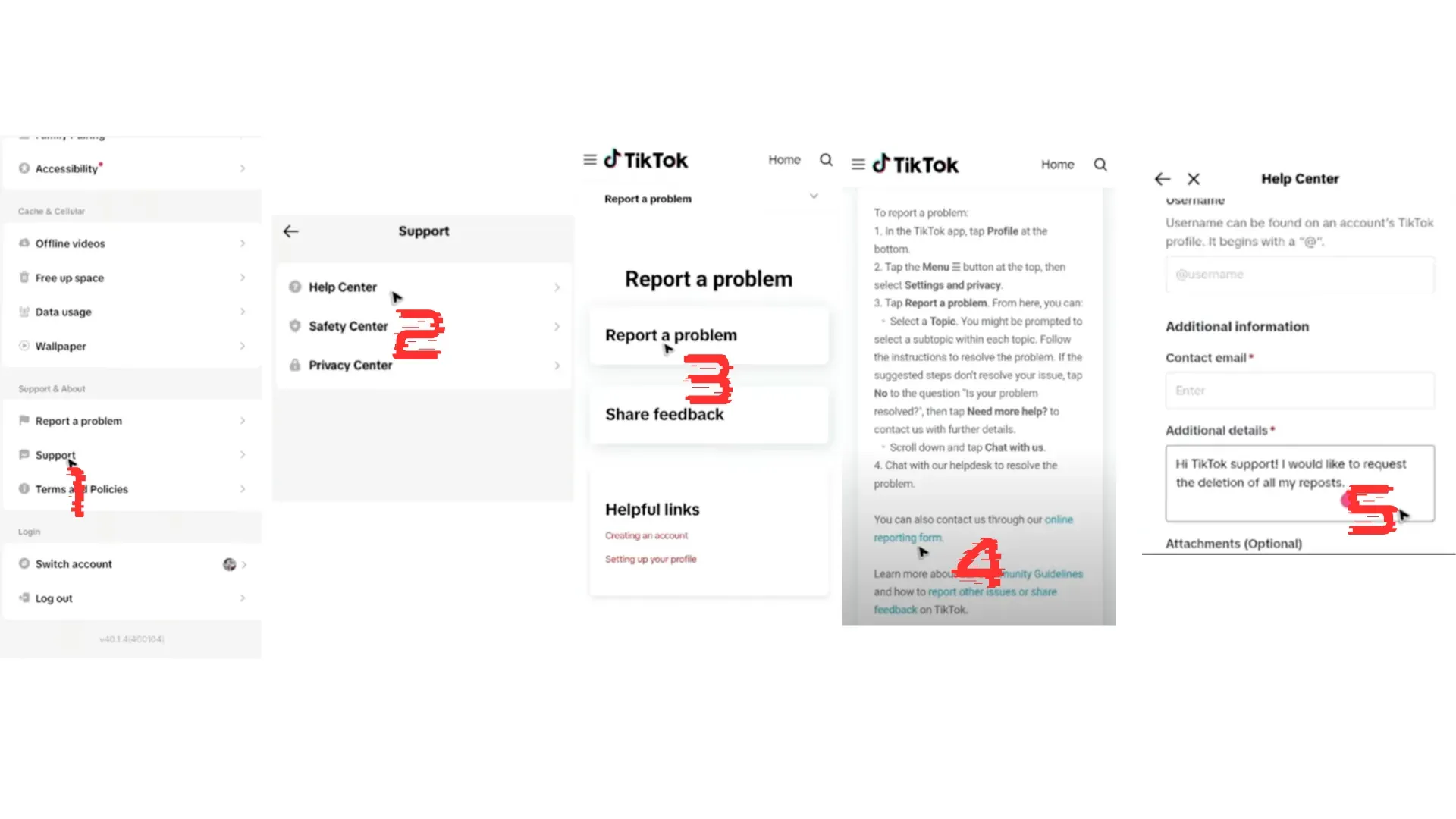
If you want TikTok to add a bulk delete option, here is the fastest request flow:
- Open TikTok -> Profile -> menu icon.
- Go to Settings and privacy -> Report a problem.
- Choose any topic -> tap "No" -> tap "Need more help".
- Send a short request like: "Please add a bulk delete reposts option."
TikTok may acknowledge the request but will still point you to manual deletion for now.
Method 2: Manual Deletion (Official Flow)
To remove a single repost:
- Open the reposted video.
- Tap Share.
- Tap Remove Repost.
Repeat for each repost you want to remove. This is the official method and works on mobile and desktop.
Method 3: Bulk Cleanup with a Browser Helper
If you have a large backlog, a desktop browser extension can save time. ClearTok is a local browser helper designed for repost cleanup:
- Runs inside your logged-in TikTok.com session.
- Uses visible UI clicks (no private APIs).
- Adds human-like delays and auto-pause to reduce rate limits.
- Creates an exportable log of what was removed.
Limitations to Know
- If TikTok hides your Reposts tab during UI tests, bulk tools cannot access it.
- Very large cleanups should be done in batches with short breaks.
- These tools only remove reposts, not original uploads.
Tips to Avoid Rate Limits
- Remove reposts in batches (200-500 at a time).
- Keep the TikTok tab focused.
- If actions slow down, pause and resume later.
FAQ
Can I delete all reposts at once on TikTok?
Not natively. TikTok does not offer a delete-all button as of 2026.
Will removing a repost delete the original video?
No. It only removes your repost; the original remains.
Is there a safe bulk method?
Look for local, browser-based tools that do not ask for your password and respect rate limits.
Can I do this on mobile?
Yes, but only manually. Bulk cleanup is easiest on desktop.
Conclusion
There is still no official bulk delete feature, but you can remove reposts manually today and request the feature from TikTok. If you need a faster workflow, a browser-based tool can help you clean up in minutes instead of hours.
Ready to clean up faster? Try ClearTok (free, browser-based, no password required).
Related Guides
Ready to Try ClearTok?
Stop deleting reposts one by one. Get ClearTok and clean up your entire TikTok profile in minutes.