

Delete or Mass Delete TikTok Reposts (2026 Guide)
Delete a repost on TikTok or remove all reposts at once with ClearTok - a safe repost remover extension. Updated for 2026.
TL;DR (Quick Answer)
Can you mass delete TikTok reposts?
Yes. While TikTok itself only allows manual deletion (one by one), you can use a browser extension like ClearTok on your computer to delete all reposts in bulk.
Time Comparison:
- Manual Deletion: ~45 mins for 100 reposts.
- Bulk Tool (ClearTok): ~3 mins for 100 reposts.
Recommendation: Use manual deletion for <10 videos. Use a desktop extension for anything more.
Quick video overview: ClearTok TikTok Repost Remover — Intro Video
1. What Exactly Is a TikTok Repost?
Think of a repost as TikTok's answer to a retweet. You are not re-uploading the clip; you are boosting the original creator's video to your followers' For You feeds without changing the content.
If you searched for a "tiktok repost remover" or "remove all reposts TikTok", this guide covers the official manual steps and a desktop helper, ClearTok, that runs locally.
Why people repost:
- Share something funny or useful with friends.
- Keep your account active on days you don’t have fresh content.
- Support other creators and spark conversation.
2. Why You Might Want to Delete One Later
| Common Scenario | What Happens |
|---|---|
| Accidentally tapped “Repost” | The clip shows up in followers’ feeds and in your Reposts tab. |
| Changed your mind about endorsing the video | Your name remains attached until you remove it. |
| You’ve spam-liked or mass-reposted and cluttered the tab | Makes profile audits messy for brands or potential sponsors. |
Reposting is reversible and no notification is sent to followers when you remove it.
3. Manual Method: Remove a Single Repost (2026 UI)
- Open TikTok and navigate to your profile.
- Tap the two-arrows icon — that’s your Reposts tab.
- Select the video you want to undo.
- Hit Share (right-facing arrow).
- Tap the yellow Remove Repost button.
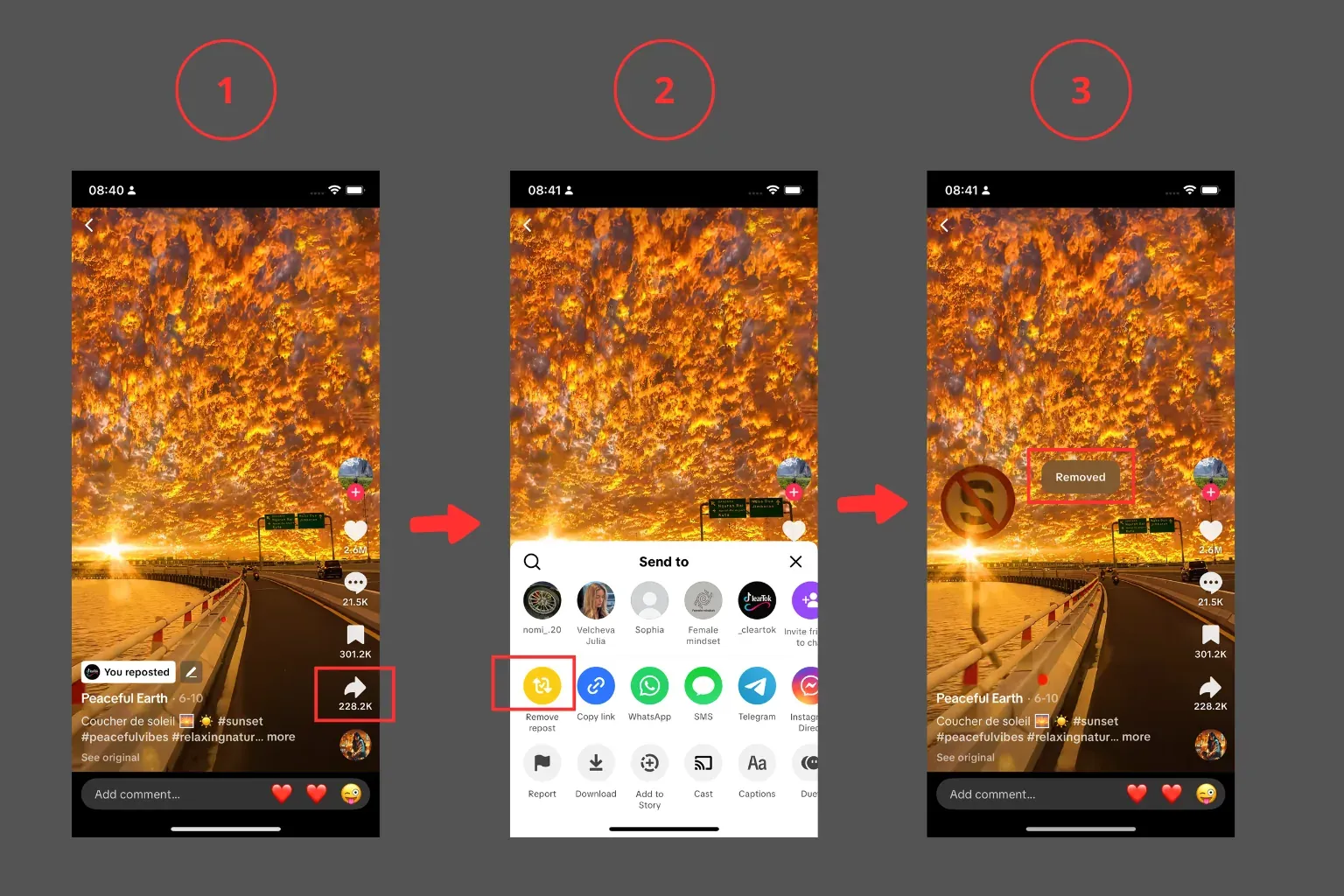
Alternate route (Android/iOS): Settings & privacy -> Activity Center -> History -> pick the video -> Share -> Remove Repost.
4. The Downsides of Doing It Manually
- Time-consuming if you have dozens to clean up.
- Easy to miss older reposts lost in your activity history.
- No batch-select; you repeat the same five taps for every clip.
- Risk of hitting TikTok rate limits if you go too fast. Brands managing multiple accounts feel this pain daily.
5. One-Click Bulk Cleanup with ClearTok
“I cleared 400+ reposts in under 5 minutes.” - early ClearTok user
ClearTok is a lightweight browser extension (Chrome, Edge, Brave, Arc) that:
- Scans your Reposts tab automatically.
- Deletes reposts with human-like pauses to avoid rate limits.
- Logs each removal so you can review what changed.
- Runs locally in your browser session and does not ask for your TikTok password.
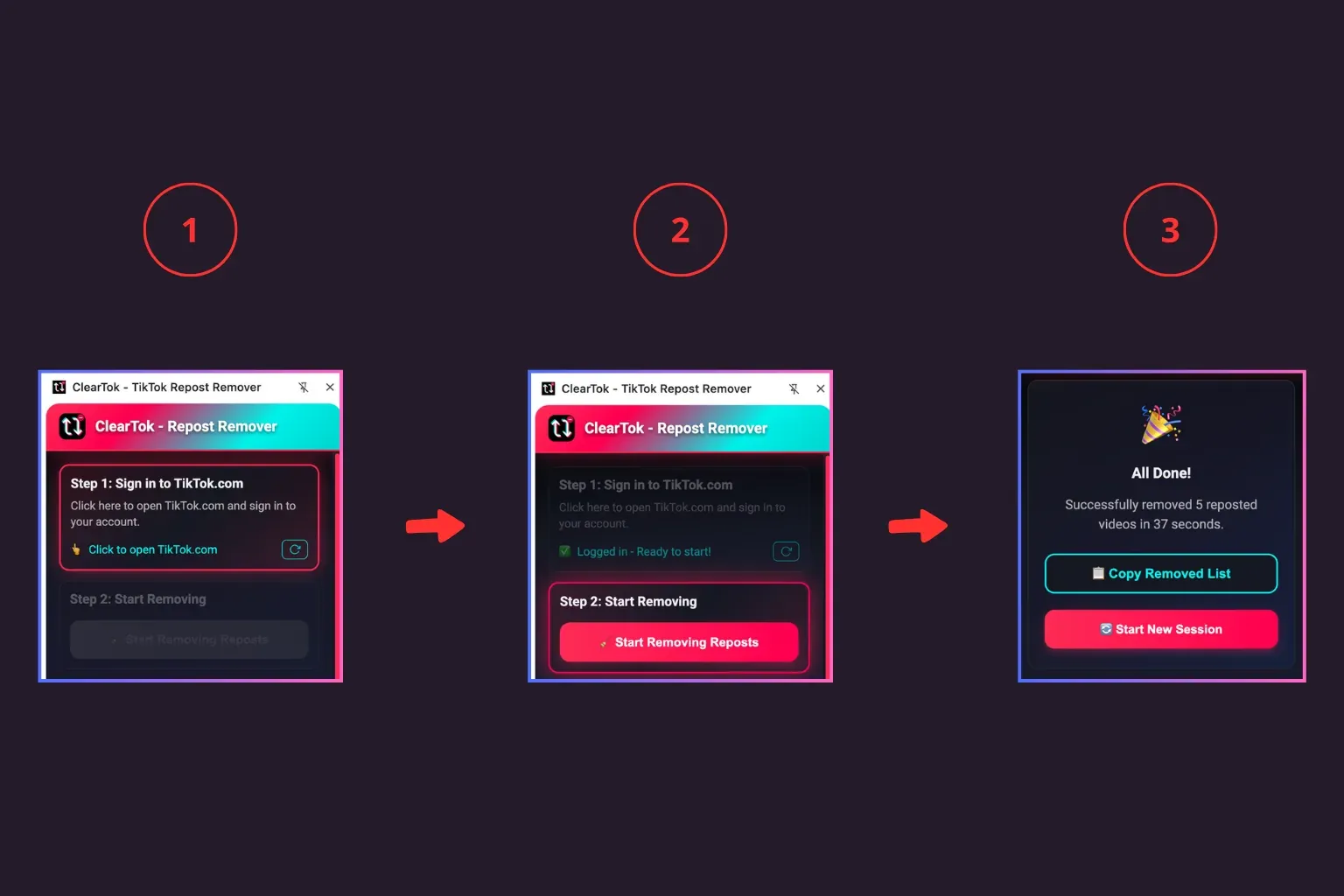
How to try it
- Install the extension -> pin it next to the address bar.
- Open TikTok on desktop and sign in.
- Click Start in ClearTok. Lean back while the counter drops to zero.
Your profile is now spotless, ready for fresh content or that brand-partnership audit.
Limitations and When Not to Use It
- If TikTok hides your Reposts tab during UI tests, ClearTok cannot access it.
- If you have a weak connection or a very large backlog, run in batches and take breaks.
- ClearTok only removes reposts, not original uploads.
6. Manual vs Bulk: Which Should You Use in 2026?
| Method | Best for | Time per 100 reposts | Pros | Cons |
|---|---|---|---|---|
| Manual (Remove Repost) | A few accidental shares | 30-60 minutes | Full control; no extra tools | Repetitive; easy to miss older reposts |
| ClearTok bulk delete | Dozens to thousands | 3-10 minutes | One click; paced to avoid rate limits; exportable log | Requires desktop browser extension |
If you only need to undo a single repost, stick to the built-in method. For deep cleanups or audits, bulk deletion is faster and more reliable.
7. Where Is “Remove Repost” on iPhone/Android vs Desktop? (2026)
iPhone/Android (2026 UI)
- Profile -> tap the two-arrows Reposts tab.
- Open the reposted video -> Share -> Remove Repost.
- Alternatively: Settings & privacy -> Activity Center -> History -> pick the video -> Share -> Remove Repost.
Desktop (tiktok.com)
- Go to your profile -> Reposts tab (two arrows).
- Open any reposted video.
- Click Share -> Remove Repost.
Pro tip: Desktop makes long cleanups easier and works seamlessly with ClearTok.
8. Troubleshooting: Can’t Find the Reposts Tab or Button
- Update the TikTok app to the latest version.
- Clear app cache: Profile -> Settings & privacy -> Free up space.
- Log out and back in (forces UI refresh).
- Try desktop web at tiktok.com where the Reposts tab is easier to spot.
- Long-press the video thumbnail in the Reposts tab to reveal Remove Repost.
- Still missing? TikTok runs UI experiments; check Activity Center -> History.
9. Safety and Rate-Limit Tips
- Avoid rapid-fire actions; pause between removals.
- Prefer local, browser-based tools that don’t ask for your TikTok password.
- ClearTok runs in your browser with human-like delays and an exportable log.
- Avoid risky downloads that advertise a "tiktok repost remover apk" or "remove all reposts TikTok apk". There is no official APK for bulk actions.
- Learn more: Is It Safe to Use Tools to Remove All TikTok Reposts?
10. FAQ: TikTok Repost Deletion (2026)
How do I delete a repost on TikTok?
Open the video -> Share -> Remove Repost. On desktop, it is the same flow.
Can I mass delete or delete all TikTok reposts at once?
TikTok does not offer a native delete-all button. Use a desktop helper like ClearTok to bulk delete in one session.
Does removing a repost delete the original video?
No. It only removes your boost; the original creator’s post remains intact.
Will followers be notified when I remove a repost?
No. TikTok does not send notifications when you unrepost.
Why can’t I see the Reposts tab?
Update the app, clear cache, relog, or switch to desktop. Some accounts are in UI tests where the tab is under Activity Center -> History.
11. Final Thoughts
Reposting is a fantastic discovery tool, but an untidy repost trail can confuse the algorithm — and your audience. Use TikTok’s built-in “Remove Repost” for the occasional cleanup, or let ClearTok handle bulk jobs in a single click so you can get back to creating.
Ready to detox your profile?
👉 Install ClearTok for free and wipe every repost today.
Related Guides
Ready to Try ClearTok?
Stop deleting reposts one by one. Get ClearTok and clean up your entire TikTok profile in minutes.