How to Check TikTok Repost Count
Paste a public TikTok username into ClearTok Repost Insights to check the repost count, recent reposts, and top creators — free, no login required.
How to Check TikTok Repost Count (Quick Answer)
To check TikTok repost count for any public profile, open ClearTok Repost Insights, paste the TikTok username or profile URL, and click Check. The report returns the total repost count plus recent reposts, top creators, repost rhythm, and caption keywords — free, with no TikTok login required.
What Is TikTok Repost Count?
TikTok repost count is the total number of public reposted videos ClearTok can find for a TikTok profile. It helps you answer a simple question: how much does this account repost, and what kind of content does it amplify?
TikTok profiles do not provide a simple public counter that says "this account has X reposts." ClearTok Repost Insights fills that gap by checking public repost activity and turning it into a readable report: repost count, recent reposts, repost rhythm, top creators, and caption keywords.
How to Check TikTok Repost Count
The fastest way to check TikTok repost count is to use ClearTok's Repost Insights page. It works with public TikTok profile URLs and usernames.
1. Open the TikTok Repost Count Tool
Go to cleartok.io/insights/reposts/ on desktop or mobile. The input accepts:
- A TikTok username, such as @username
- A full TikTok profile URL
- A username without the @ symbol
2. Enter a Public TikTok Profile
Paste the profile you want to analyze and click Check. ClearTok does not ask for your TikTok login or password to check public repost data.
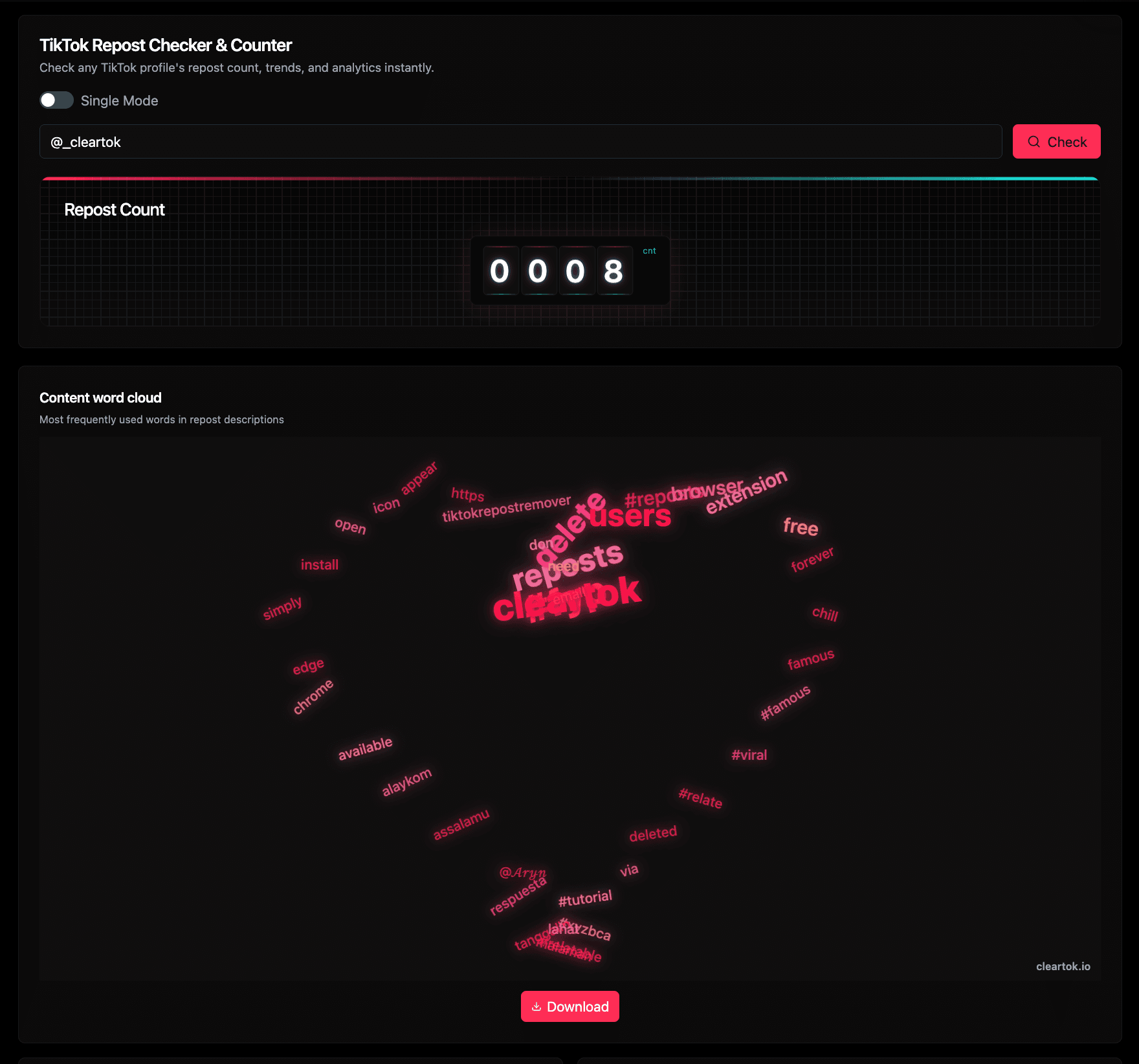
ClearTok Repost Insights shows the profile input, repost count, and keyword overview in one report.
3. Read the Repost Count and Context
The headline number gives the TikTok repost count. The surrounding modules help you understand what that number means:
- Repost count - the total visible reposts ClearTok found for the profile
- Word cloud - repeated terms from repost captions and hashtags
- Top creators - creators who appear most often in the repost history
- Repost rhythm - monthly and yearly activity patterns
- Recent reposts - examples you can inspect individually
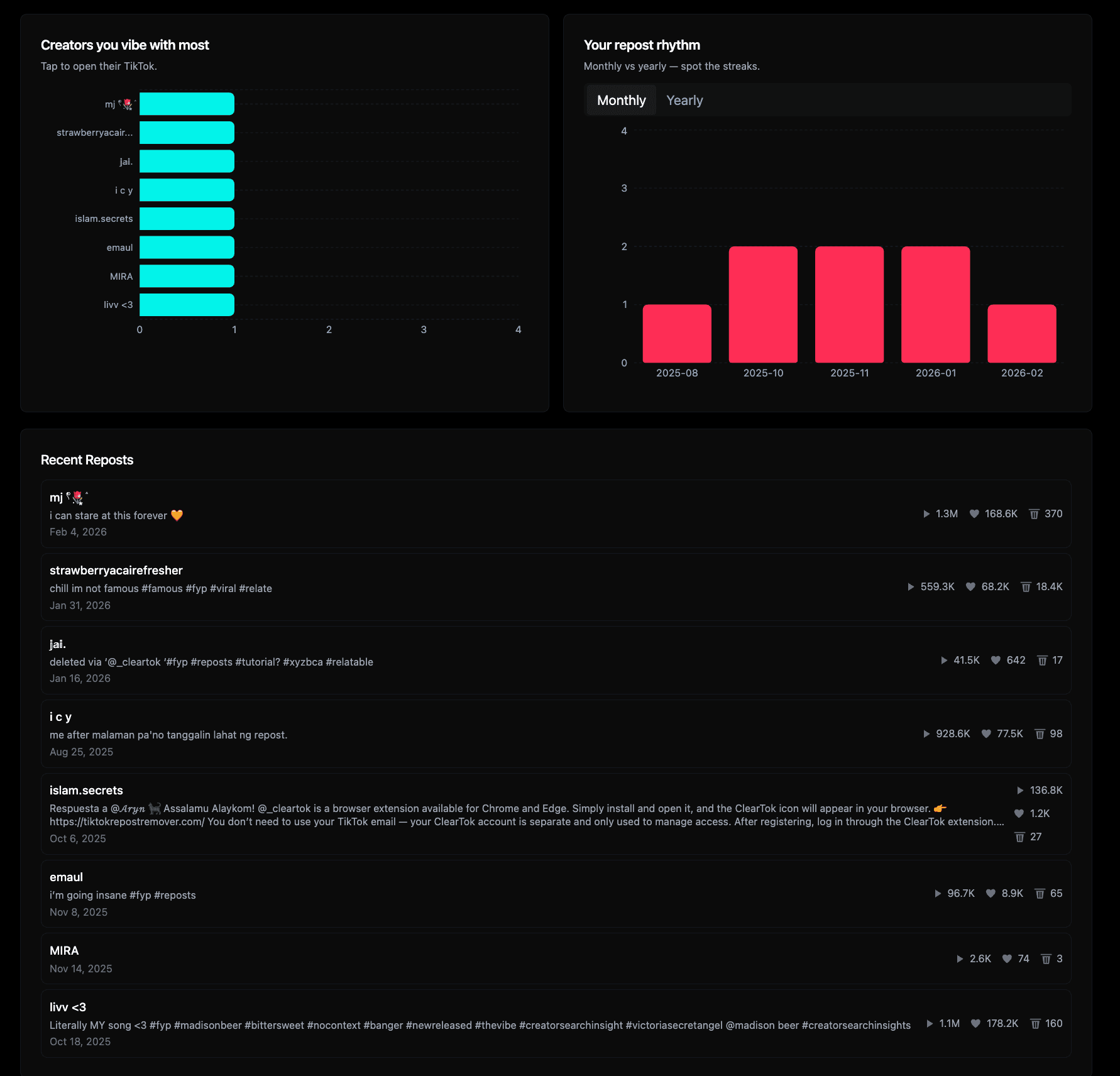
The analytics view helps explain the TikTok repost count with creator, timing, and recent repost signals.
How ClearTok Calculates TikTok Repost Count
ClearTok checks publicly accessible repost activity for the TikTok profile you enter. The tool is designed for quick public-profile analysis, not private account access.
Here is the practical methodology:
- You provide a public TikTok username or profile URL.
- ClearTok reads available repost data for that public profile.
- The report counts visible reposts and groups the data into useful views.
- If a profile has limited public data, private visibility, or a very large history, the result may be capped or incomplete.
This is why the page may sometimes show a capped total such as 100+ or up to the current tool limit. A capped result still tells you the profile has at least that many reposts, but it should not be treated as a full lifetime archive when TikTok does not expose more public data.
What TikTok Repost Count Can and Cannot Tell You
| Signal | What it helps you understand | What it does not prove |
|---|---|---|
| Total repost count | How active a profile is in reposting public videos | Whether every historical repost is still accessible |
| Repost rhythm | Whether reposting happens steadily or in bursts | The user's reason for reposting |
| Top creators | Which creators appear most often in the profile's reposts | A formal partnership or sponsorship |
| Word cloud | Repeated topics, fandoms, locations, or product terms | Exact audience intent |
| Recent reposts | What the profile is currently amplifying | A complete view of private or unavailable activity |
This distinction matters for E-E-A-T: a useful TikTok repost count page should not only return a number. It should also explain the data source, limitations, and interpretation.
When to Use a TikTok Repost Count Tool
For Creators
Use repost count to understand how often a public profile amplifies other creators' videos. If you are studying your own profile, it can also help you decide whether your repost history still matches your current personal brand.
For Brands and Influencer Research
For brand checks, TikTok repost count is a useful first-pass signal. A profile with many reposts may be highly active in a niche community, but you still need to review the actual reposts, creators, and topics before making a judgment.
Before Cleaning Up Your Own Reposts
If you are planning to remove reposts, count first. The number helps you estimate cleanup size before using tools such as ClearTok Repost Remover or reading the guide to delete all reposts on TikTok at once.
Free vs Premium TikTok Repost Count Checks
| Feature | Free | Premium |
|---|---|---|
| TikTok repost count | Up to 100 visible reposts | Up to 1,000 visible reposts |
| Trend charts | Included | Included |
| Top creators | Included | Included |
| Word cloud | Included | Included |
| Queries per month | 5/day | 50/month |
Upgrade to Premium if you need deeper checks for large repost histories.
Trust and Privacy Notes
ClearTok is an independent tool and is not affiliated with TikTok or ByteDance. The TikTok repost count checker is built for public-profile analysis and does not require your TikTok password.
The screenshots in this guide are taken from ClearTok Repost Insights so you can see the actual workflow before using the tool. This page was last reviewed on May 5, 2026 to keep the instructions aligned with the current ClearTok interface.
Related TikTok Repost Tools and Guides
- TikTok Repost Insights - check repost count, creators, rhythm, and recent reposts
- TikTok Post Insights - analyze post activity instead of repost activity
- How to See Reposts on TikTok - learn where to find your repost tab
- How to Keep Certain TikTok Reposts When Cleaning Up - keep selected reposts before deleting the rest
Disclaimer: "TikTok" is a trademark of ByteDance Ltd. ClearTok is an independent tool and is not affiliated with or endorsed by TikTok or ByteDance.
Ready to Try ClearTok?
Stop deleting reposts one by one. Get ClearTok and clean up your entire TikTok profile in minutes.
Browser Extension
Mobile App