
Best TikTok Cleaner Extension 2026 – Free, No Ads, No Password
The top-rated Chrome and Edge extension to clean up your TikTok profile in 2026. Bulk remove reposts, no password required, completely ad-free. Rated #1 by users.
💡 If your priority is wiping the Reposts tab specifically, jump to our dedicated bulk repost remover page — same tool, focused walkthrough.
Why You Need a TikTok Cleaner Extension
If your TikTok profile is cluttered with hundreds of accidental reposts, outdated videos, or off-brand content, you need a TikTok cleaner extension to take back control. Unfortunately, TikTok doesn't offer a native "clean up" or "delete all" feature, so you're stuck removing content one by one — unless you use a browser extension.
A good TikTok cleaner extension should:
- Remove all reposts in bulk
- Delete videos you no longer want
- Run safely without asking for your password
- Work directly in your browser on TikTok.com
Top TikTok Cleaner Extensions in 2026
1. ClearTok — Best Overall TikTok Cleaner Extension
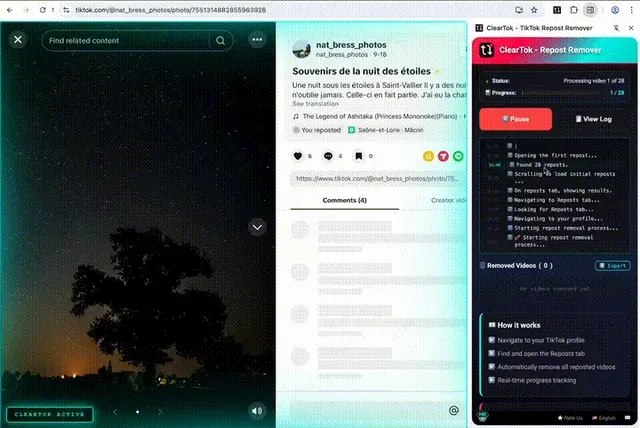
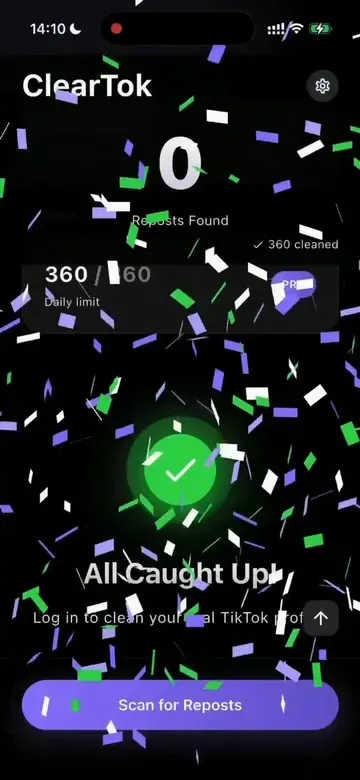
ClearTok is a free, open-source TikTok repost cleaner that ships on every major device — a Chrome extension, an Edge add-on, an iOS app for iPhone and iPad, and an Android app on Google Play. Each version performs the same end-to-end bulk removal of TikTok reposts and videos.
| Feature | Details |
|---|---|
| Price | Free |
| Browsers | Chrome, Edge, Brave, Opera |
| Requires Password? | No |
| Open Source? | Yes (GitHub) |
| What it cleans | Reposts, Videos |
| Safety | Local-only, human-like pacing |
| Mobile | iOS app available |
Why ClearTok stands out:
- No password required — ClearTok runs inside your own logged-in browser session. It never asks for your TikTok credentials.
- 100% local — Nothing is sent to external servers. Your data stays on your device.
- Smart pacing — Built-in rate limiting mimics human behavior to protect your account.
- Background operation — Start it and switch tabs. ClearTok works in the background.
- Export reports — Download a list of all removed URLs for your records.
How to use ClearTok to clean your TikTok:
- Install ClearTok from the Chrome Web Store or Edge Add-ons
- Open TikTok.com and sign in
- Go to your Profile → Reposts tab
- Click the ClearTok icon and hit Start
- ClearTok removes all reposts automatically
2. Other "TikTok Cleaner" Tools
You may find other tools marketed as TikTok cleaners. Here's what to watch out for:
| Risk Factor | ClearTok | Cloud-Based Cleaners |
|---|---|---|
| Password Required | ❌ No | ⚠️ Often Yes |
| Runs Locally | ✅ Yes | ❌ No (remote servers) |
| Open Source | ✅ Yes | ❌ Usually No |
| Account Ban Risk | Low | High |
| Cost | Free | $5–$15+ |
⚠️ Warning: Tools that ask for your TikTok password or log in from remote servers put your account at risk. TikTok actively detects suspicious logins from foreign IPs and may ban your account.
TikTok Cleaner Extension vs. Manual Cleanup
| Method | Time for 500 reposts | Risk | Cost |
|---|---|---|---|
| Manual (phone) | ~2 hours | Low | Free |
| ClearTok Extension | ~8 minutes | Low | Free |
| Cloud-based app | Unknown | High | Paid |
Using a TikTok cleaner extension like ClearTok saves you hours of repetitive tapping. And since it runs locally in your browser, it's just as safe as doing it manually — only much faster.
What Can a TikTok Cleaner Extension Remove?
Reposts
The most common use case. TikTok makes it incredibly easy to accidentally repost videos (the button is right next to "Like"). A TikTok cleaner extension helps you:
- Remove all TikTok reposts at once
- Clean up accidentally reposted content
- Maintain a professional profile aesthetic
Videos
ClearTok also supports bulk video deletion. If you want to start fresh or remove old content:
- Delete all TikTok videos in bulk
- Filter by date range
- Export URLs before deletion
Frequently Asked Questions
Is a TikTok cleaner extension safe? It depends on the extension. ClearTok is safe because it runs locally, is open-source, and never asks for your password. Avoid any extension that requires your TikTok credentials.
Does ClearTok work on mobile? Yes — ClearTok ships on every device. There's an iOS app for iPhone and iPad on the App Store, an Android app on Google Play, and the browser extension works in Chrome and Edge on desktop. All four versions perform the same bulk repost cleanup.
Can a TikTok cleaner extension delete my original videos? ClearTok only targets content in the Reposts tab by default. When using video deletion mode, you have full control over what gets removed.
Is ClearTok really free? Yes. ClearTok is completely free and open-source. There's an optional Premium plan for power users who need advanced analytics features.
What about "TikTok all reposted videos remover"? That's exactly what ClearTok does! It removes all reposted videos from your TikTok profile automatically, whether you have 50 or 5,000 reposts.
Get Started
Clean up your TikTok profile in minutes:
Disclaimer: "TikTok" is a trademark of ByteDance Ltd. ClearTok is an independent tool and is not affiliated with or endorsed by TikTok or ByteDance.
Ready to Try ClearTok?
Stop deleting reposts one by one. Get ClearTok and clean up your entire TikTok profile in minutes.
Browser Extension
Mobile App